
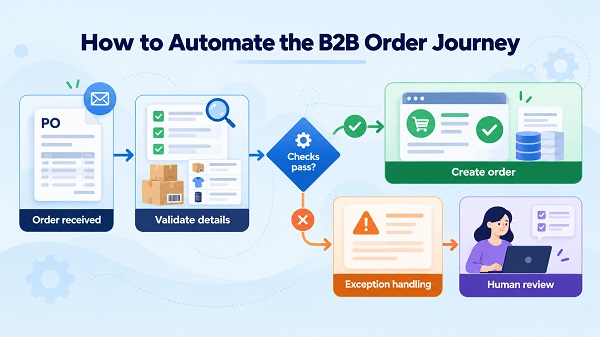
How to Automate the B2B Order Journey
B2B orders often pass through more steps than the customer sees: emails arrive, product codes are checked, account-specific prices are confirmed, approvals are requested, and order details are entered into business systems. When these steps depend on manual work, delays and data-entry errors can accumulate.
The practical goal of B2B order automation is not to remove people from every decision. It is to automate predictable checks, route exceptions to the right person, and keep a reliable record of what happened.
A useful starting point is to map the journey from the moment an order or request arrives to the moment it is accepted by the next system or team. Then assess two things separately: the opportunity for automation and the complexity and controls required to implement it safely.
1. Map the order journey before choosing what to automate
Start by documenting how an order moves through the business today. Include the formal process and the work that happens outside it, such as follow-up emails, spreadsheets, messaging apps, and repeated data entry.
A typical journey might look like this:
- A customer submits an order, purchase order, email, spreadsheet, or request for a quote.
- The business identifies the customer and checks the submitted information.
- Products, SKUs, quantities, prices, and applicable account terms are validated.
- Missing details or exceptions are sent to the relevant person.
- Required commercial or operational approvals are recorded.
- The order is created or updated in the appropriate business system.
- The customer and internal teams receive the next-step confirmation.
- The business records the outcome so the order can be traced and measured.
Not every business needs every step, and some steps may occur in a different order. The point is to document the real process before automating it.
For each step, record who performs it, what information they need, which system they use, how often the step occurs, and what happens when something goes wrong. This reveals whether the main problem is repetitive work, poor data, unclear ownership, disconnected systems, or a decision that genuinely requires human judgment.
2. Use a two-axis framework to prioritize automation
A single score can hide an important distinction: a process may offer substantial savings but also carry high implementation risk. Evaluate the opportunity separately from the complexity and controls required.
This is an editorial decision tool, not an industry-standard assessment or a validated predictive model. Its purpose is to help business and technical teams make assumptions visible before committing to a pilot.
Axis A: Automation opportunity (0–6)
Score three factors from 0 to 2. Higher scores mean the process is a stronger candidate for automation.
| Factor | 0 — Low opportunity | 1 — Moderate opportunity | 2 — High opportunity |
|---|---|---|---|
| Order volume | Few orders and little repetitive work | Regular orders with some repeated steps | Frequent orders or requests |
| Manual touches | Little manual handling per order | Several checks or handoffs | Repeated entry, copying, checking, or follow-up |
| Error and rework burden | Errors and rework are uncommon | Recurring corrections or delays | Frequent avoidable errors, re-entry, or rework |
Total opportunity score: 0–6.
For this tool, a score of 4–6 is provisionally high opportunity. A score of 0–3 is provisionally lower opportunity. These are suggested editorial thresholds, not industry benchmarks; adjust them to the business’s order volume, cost structure, and priorities.
Axis B: Complexity and implementation controls (0–10)
Score five factors from 0 to 2. This score describes the effort and safeguards required to automate the process.
| Factor | 0 — Lower complexity | 1 — Moderate complexity | 2 — Higher complexity |
|---|---|---|---|
| Systems involved | One system with a clear workflow | Two systems or a simple integration | Several systems or fragile dependencies |
| Approval requirements | Clear rules and no special approval | Occasional approval needed | Multiple approval levels or conditional rules |
| Exception frequency | Most cases follow the same path | Exceptions are regular but manageable | Many cases require judgment or special handling |
| Data quality problems | Required fields are consistent | Some missing, inconsistent, or outdated data | Frequent ambiguity, mismatches, or unreliable source data |
| Sensitivity of errors | Errors have limited consequences and are easy to correct | Errors can affect fulfillment, cost, or customer commitments | Errors could materially affect order value, credit terms, contractual conditions, or other consequential decisions |
Total complexity and controls score: 0–10.
The sensitivity-of-errors factor measures the consequences of getting a decision wrong, not just how technically difficult it is to automate. For example, automatically formatting an order reference is different from automatically approving a credit exception.
For this tool, a score of 6–10 is provisionally high complexity, while 0–5 is provisionally lower complexity. The threshold differs from the opportunity threshold because the axes have different purposes and ranges: opportunity measures three factors out of six, while complexity and controls measure five factors out of ten. Both thresholds are editorial starting points, not statistically calibrated cutoffs.
Interpret the two scores together
| Opportunity | Complexity and controls | Suggested decision |
|---|---|---|
| High | Lower | Consider a focused automation pilot with clear acceptance tests |
| High | High | Break the workflow into smaller stages; strengthen controls and human review |
| Lower | Lower | Keep the process manual for now or automate only a small, inexpensive step |
| Lower | High | Defer broad automation unless there is a specific risk, compliance, or service reason to act |
One additional rule takes priority over the quadrant: if data-quality problems score 2, do not allow the overall score to justify unattended processing. First improve the source data or use a controlled draft-and-review workflow. A high opportunity score does not make unreliable inputs safe.
These categories are guidance, not hard boundaries. A one-point change can move a process across a threshold, so treat borderline results as a reason to review assumptions rather than as a different business reality.
3. A worked example: automating incoming distributor orders
Consider a hypothetical distributor that receives orders by email and spreadsheet. Staff repeatedly copy line items into an internal system, check product codes, confirm account-specific prices, and resolve incomplete requests.
This is an illustrative scenario, not a customer case study or a claim about a real implementation.
Score the opportunity
| Factor | Score | Reason |
|---|---|---|
| Order volume | 2 | Orders arrive regularly |
| Manual touches | 2 | Staff repeatedly transfer and check information |
| Error and rework burden | 1 | Corrections occur, but their frequency has not been established as high |
| Opportunity total | 5/6 | High under the proposed threshold |
Score complexity and controls
| Factor | Score | Reason |
|---|---|---|
| Systems involved | 1 | The workflow involves an order source and an internal business system |
| Approval requirements | 1 | Some cases need approval |
| Exception frequency | 1 | Incomplete requests and mismatches occur |
| Data quality problems | 2 | Incoming product and order details are sometimes unreliable |
| Sensitivity of errors | 1 | Incorrect pricing or order details could affect fulfillment and customer commitments |
| Complexity and controls total | 6/10 | High under the proposed threshold |
The result is high opportunity / high complexity and controls. The data-quality score also activates the explicit gate. The sensible starting point is therefore not unattended order creation: it is a controlled pilot that prepares a draft, validates what it can, and routes uncertain cases for human review.
Because 6/10 sits exactly at the suggested complexity threshold, even a one-point change could move this example into the lower-complexity category. That is another reason to treat the score as a discussion aid, not an automatic decision.
The next step is to define the checks, exception routes, and acceptance criteria before connecting the workflow to live order processing.
4. Design acceptance checks before an order can proceed
An automation should not treat every incoming request as valid simply because it can extract fields from it. Before accepting an order, define which checks can run reliably using explicit business rules and which situations require a person.
Checks that may be suitable for rules-based automation
Depending on the business’s systems and approved rules, automated checks may include:
- Required fields are present, such as customer identifier, SKU, quantity, and requested delivery details.
- The customer or company account can be matched to a known record.
- The SKU exists in the approved product catalogue.
- Quantity and unit formats are valid.
- The submitted price matches the applicable approved price list or contract data.
- Required references, such as a purchase order number, follow the expected format.
- The request does not appear to be a duplicate of an existing order.
- The workflow has the required approval record before it proceeds.
These checks are appropriate only when the relevant data source and rule are authoritative and current. A rule cannot reliably confirm a contract price if the system holding that price is outdated or incomplete.
Cases that should be routed for review
Human review is appropriate when the workflow encounters, for example:
- A SKU that cannot be matched confidently.
- A price that conflicts with the approved account terms.
- A quantity, discount, or delivery request outside authorized limits.
- Missing information that changes the meaning of the order.
- Conflicting customer, contract, or purchase-order records.
- A possible duplicate that cannot be resolved safely by a defined rule.
- A credit, contractual, or other consequential decision outside the workflow’s approved authority.
Define the permitted outcomes explicitly. A useful set is:
- Accept: all required checks pass and the workflow has authority to proceed.
- Reject: a defined rule establishes that the request cannot be accepted.
- Request more information: a required field or clarification is missing.
- Human review: the request needs judgment, approval, or resolution beyond the automated rules.
“Reject” should not become a catch-all for uncertainty. If the system cannot determine whether a request is valid, it should usually ask for clarification or route the case to a responsible person rather than invent a conclusion.
5. Build a controlled pilot with reliable system behavior
Once the workflow and checks are defined, choose one narrow process to test. For example, start with a single order source, a defined customer group, or a limited product range. Avoid automating every order type and exception in the first release.
A pilot should make it possible to understand exactly what the automation did, why it did it, and how to recover when something fails.
Prevent duplicate processing
A common risk occurs when the same order arrives twice or a system retries a request after a timeout. Without a duplicate-control mechanism, the workflow could create two records or repeat a downstream action.
One approach is to assign each incoming request a stable processing key and check whether that request has already been processed before creating the next record. In software engineering, this is often called idempotency: repeating the same operation should not produce an unintended duplicate effect.
The key must reflect the actual business process. A purchase order number alone may not be unique across all customers or order revisions, so the business should define which fields identify a request and how legitimate changes are handled.
Record what happened
Maintain an audit trail that records the request identifier, validation results, workflow version, actions taken, timestamps, exception reason, and any human decision required by the process.
Access to customer and order data should be limited to the people and systems that need it. Logs should contain enough information to investigate a problem without unnecessarily copying sensitive data into multiple locations.
Plan for partial failures and recovery
A workflow may succeed in one system but fail before updating another. For example, a draft order could be created while a confirmation message fails to send. The workflow needs to record that partial outcome and provide a clear retry or recovery path.
A compensating action is a follow-up step designed to correct or neutralize an earlier action when a simple rollback is not possible. If a downstream system has already accepted an order, deleting a local record may not reverse the external effect. The recovery procedure must reflect what each system can actually undo.
Keep these behaviors explicit:
- What should be retried automatically?
- What should stop after a defined failure?
- Who receives an alert?
- How are partially completed requests reconciled?
- How does the team prevent a retry from duplicating a completed action?
- Who can authorize a correction or reversal?
Use Shopify documentation as a platform-specific reference
Shopify’s documentation describes B2B capabilities and workflow automations, including templates for tagging B2B orders, sending internal notifications, and sending invoices to multiple email addresses. These are examples of platform capabilities, not evidence that every B2B process can be automated without custom work or configuration. See Shopify B2B and Shopify B2B workflow automations for the details available at the time of writing.
For the technical team, document the data mapping, authentication, permissions, retry policy, idempotency key, error handling, and ownership of each integration. The business team should be able to understand the resulting process without needing to interpret implementation code.
6. Keep human review where the consequences require it
Automation and AI can assist with different parts of an order workflow, but they should not be treated as interchangeable.
Rules-based automation is generally easier to audit when the decision can be expressed as a clear condition: a required field exists, an SKU matches a catalogue, or a price equals an approved value. AI may help interpret unstructured emails, extract information from documents, classify requests, or identify fields that need attention. Its output should still be checked against trusted records and approved business rules.
For example, an AI system might extract a product code and quantity from a purchase-order PDF. The workflow can then compare the extracted code with the product catalogue and check the quantity format. If the extracted SKU is ambiguous, the system should route the request for review rather than selecting the closest-looking product and placing an order.
Human review should remain required where the process involves uncertain data, conflicting records, unusual discounts, material credit decisions, contractual exceptions, or consequences that exceed the system’s authorized limits.
A practical approach is to define confidence thresholds and permitted actions before deployment. A confidence score alone should not authorize a consequential action unless it has been tested against representative data and combined with appropriate controls. Keep a record of overrides and recurring failure types so the workflow can be improved.
The NIST AI Risk Management Framework provides a voluntary framework for considering AI trustworthiness and managing risks. NIST’s Generative AI Profile, AI 600-1, published on July 26, 2024, at the time of writing, provides additional guidance focused on generative AI. These are general risk-management resources, not proof that a particular automation design will be effective.
Customer documents and order records may contain personal or commercially sensitive information. Decide what can be sent to an AI service, what must be retained, who can access it, and how outputs will be reviewed. Data protection obligations vary by jurisdiction; this article is not legal advice.
7. Handle exceptions with named states and owners
An automation becomes difficult to manage when every problem is simply labelled “failed.” Give exceptions clear states, explanations, and responsible owners so that work does not disappear into an inbox or queue.
| State | Meaning | Responsible owner |
|---|---|---|
| Ready for the next step | Required checks passed and the workflow is authorized to continue | Workflow owner or downstream process owner |
| Needs clarification | Required information is missing or ambiguous | Customer-facing account owner or order-processing team |
| Needs approval | The request requires an authorized business decision | Named approver, such as sales, finance, or operations |
| Failed validation | A defined rule failed, such as an unknown SKU or invalid quantity | Order-processing team or designated data owner |
| Possible duplicate | The request matches an existing or in-progress request closely enough to require investigation | Order-processing team, with system support |
Each state should have a clear next action, a way to identify the original request, and an escalation path if it remains unresolved. Avoid silently dropping failed requests or allowing them to move forward simply because an exception queue is unattended.
Where practical, set service expectations for reviewing each exception type. Those expectations should reflect actual staffing and business needs rather than arbitrary targets added to make the automation look successful.
8. Measure the pilot using defined metrics
Measure whether the workflow improves the process, not just how many tasks it performs. Set the measurement rules before the pilot begins, record the baseline, and compare like with like.
For every metric, define the numerator, denominator, measurement window, data source, and exclusions. Otherwise, a change in how the team labels or records orders could look like an improvement when the underlying process has not changed.
| Metric | Definition | Source and window |
|---|---|---|
| Straight-through processing rate | Eligible orders completed without manual intervention ÷ all eligible orders received in the same cohort | Workflow logs and order system; report weekly and over a pre-agreed pilot period |
| First-pass validation rate | Eligible orders that pass all initial automated checks ÷ all eligible orders checked | Validation logs; use the same order cohort as the processing-rate metric |
| Exception rate | Eligible orders routed to an exception state ÷ all eligible orders processed | Exception queue and workflow logs; break down by exception type |
| Order processing time | Elapsed time between the defined receipt event and the defined completion event | Timestamped order and workflow records; compare the same order types before and during the pilot |
| Correction or rework rate | Processed orders requiring a correction attributable to an error ÷ all processed orders in the cohort | Order change history, support records, or a consistently maintained correction log |
| Cost per processed order | Total defined processing cost for the measured cohort ÷ number of orders processed in that cohort | Agreed labor-cost assumptions, platform and integration costs, and order counts over the same window |
For processing time, decide whether the clock includes time waiting for the customer or an approver. Report that waiting time separately if it matters to the business. For cost per processed order, define which costs are included—such as staff time, platform charges, and ongoing maintenance—and use the same cost boundary in the baseline and pilot.
Set acceptance criteria before launch
Choose criteria based on the current baseline and the business’s tolerance for risk. For example, a team might require that:
- The workflow correctly identifies the required fields and approved product records in a representative test set.
- No order is submitted without the required validations and approvals.
- Duplicate handling and retry behavior pass documented tests.
- Failures and partial failures create traceable records and reach the right owner.
- The exception rate and processing time stay within limits agreed before the pilot.
- The cost calculation includes ongoing support and maintenance, not just the initial build.
These are examples of criteria to tailor—not universal performance targets. Do not select a numerical target merely because it sounds ambitious. Use a test set that reflects the actual variety of orders and include difficult cases, not just clean examples.
If the pilot fails an acceptance criterion, pause or limit the affected automation, investigate the failure, and revise the rules or process before expanding it.
9. Readiness checklist before implementation
Use this checklist with operations, sales, finance, and the technical owner before connecting an automation to live order processing.
- The current order journey and its manual handoffs are documented.
- The first pilot has a defined scope, customer group, order source, and product range.
- Required fields and authoritative data sources are identified.
- SKU, quantity, price, account, and approval checks are written as explicit rules where possible.
- The team has defined which cases can proceed automatically and which require human review.
- Data-quality problems have an owner and a remediation plan.
- Duplicate detection and idempotent processing behavior are defined.
- Retry limits, partial-failure handling, recovery, and escalation procedures are documented.
- Audit records capture the actions and decisions needed to investigate problems.
- Access permissions and the handling of customer or commercially sensitive data are agreed.
- Baseline metrics, denominators, time windows, data sources, and pilot acceptance criteria are recorded.
- A named business owner and technical owner are responsible for monitoring the pilot and approving changes.
The checklist is complete when each item has a clear answer and an accountable owner—not simply when a box has been marked.
Start with one measurable workflow. The best first automation is not necessarily the most sophisticated one. It is a workflow with a clear business problem, enough repetition to justify the effort, data that can be checked, and a safe way to handle exceptions.
Map the current process, score the opportunity and implementation controls separately, and let data-quality or high-consequence decisions trigger additional safeguards. Then test one bounded workflow against acceptance criteria agreed in advance. That approach gives the business a way to evaluate automation based on its own process evidence, while keeping order accuracy, accountability, and recovery in view



Leave a Reply